


💡 How to Use Boolean Search Like a Pro in Sales Navigator

Often seasoned users overlook one of its best-kept secrets in Sales Navigator: Boolean search. Mastering Boolean search can transform how you prospect. Whether you’re trying to reach a VP in a specific industry or filter out the noise in your search results, Boolean logic lets you do it faster and smarter. Here’s how to use Boolean like a pro:
💡 What Is Boolean Search?
Boolean search uses a combination of keywords and operators like AND, OR, NOT, and quotes ("") to include, combine, or exclude search terms. When used properly in Sales Navigator, it helps you find the right people, faster. Think of it as logic-based filtering that sharpens your results without endlessly adjusting drop-down filters.
🛠️ Key Boolean Operators:
-
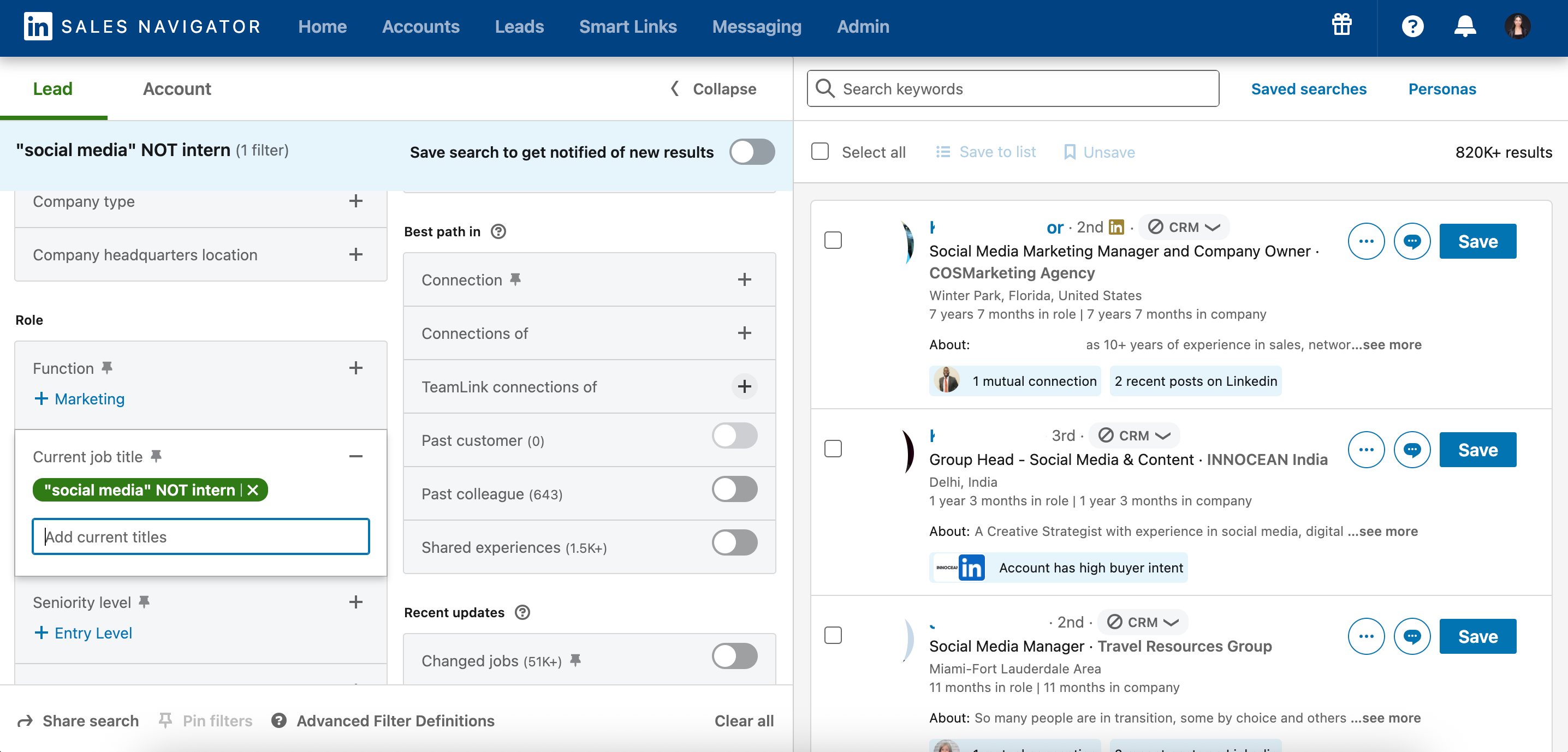
NOT searches: Type the word NOT (capital letters) immediately before a search term to exclude it from your search results. This typically limits your search results. For example, "sales NOT manager".
-
OR searches: Type the word OR (capital letters) to see results that include one or more items in a list. This typically broadens your search results. For example, "sales OR marketing OR advertising”.
-
AND searches: AND searches: Type the word AND (capital letters) to see results that include all items in a list. This typically limits your search results. For example, "accountant AND finance AND CPA".
-
Quotes ("") – This will allow you to search for exact phrases.
Example: “product marketing manager” -
Parentheses () – Combine multiple terms and control the order.
Example: (“CMO” OR “VP Marketing”) AND SaaS NOT Intern
Pro Tip: Save Your Search! Once you build a search with Boolean that delivers great results, click “Save Search.” Sales Navigator will send you alerts when new profiles match your criteria — a consistent source of fresh leads.
🎯 Where Can You Use Boolean in Sales Navigator?
Boolean logic only works in specific keyword-based fields. In Sales Navigator, you can use Boolean search in fields like Job Title, Company, and Keywords. These areas allow for greater precision when you're trying to include or exclude certain roles, industries, or terms. However, keep in mind it won’t work in structured filters like Industry, Function, or Seniority level as those use pre-set dropdowns.
Mastering Boolean search in Sales Navigator can dramatically sharpen your prospecting efforts. By strategically combining keywords with AND, OR, and NOT, you filter out noise and focus on exactly the leads that matter. It’s a simple skill that delivers powerful results
For full information on Boolean Search take a look at our Help Center article here! Let us know below if you have any additional Boolean Search insights or advice you would like to share. 👇