


💡 Everything you need to know about Message Assist

  • June 10, 2025
  • 7 replies
  • 335 views

Kamille_Former Cmty Manager
Community Champion
Forum|alt.badge.img+8

In Sales Navigator, Message Assist helps you create unique, personalized messages to potential leads using AI. It drafts initial touch InMail messages by leveraging account insights, lead data, and key product or service selling points. While top sellers typically spend hours researching before reaching out, Message Assist streamlines this process, enabling you to follow InMail best practices and connect with more decision makers quickly and effectively.


What is Message Assist and how does it work?

Message Assist, one of the latest features in our AI suite, Message Assist helps you adopt InMail best practices and connect with decision makers with the right message in less time. 

  • Pairs LinkedIn’s unique first-party insights with newest advanced AI models from Microsoft ecosystem
  • Delivers timely, personalized, and high-impact outreach
  • Aligns outreach with each account’s unique needs using Account IQ


Message Assist combines Lead IQ insights (like commonalities or recent activity on LinkedIn) with Account IQ data (like strategic priorities or challenges) to help draft an engaging and personalized InMail. Your message recipient won’t be notified that AI assistance was used to draft your message.


Important to Note: You can only message one lead at a time. You can send a maximum of six AI-assisted messages per minute, and a total of 50 AI-assisted messages per month. Each message uses one InMail credit, though if the lead responds to your message, the credit will be returned.


Who can utilize Message Assist?

Message Assist is currently available for Advanced and Advanced Plus users of Sales Navigator. It is also only available in English and may not be available to everyone. Keep in mind that admins can turn off Message Assist for all users on their account.


How can I use Message Assist?

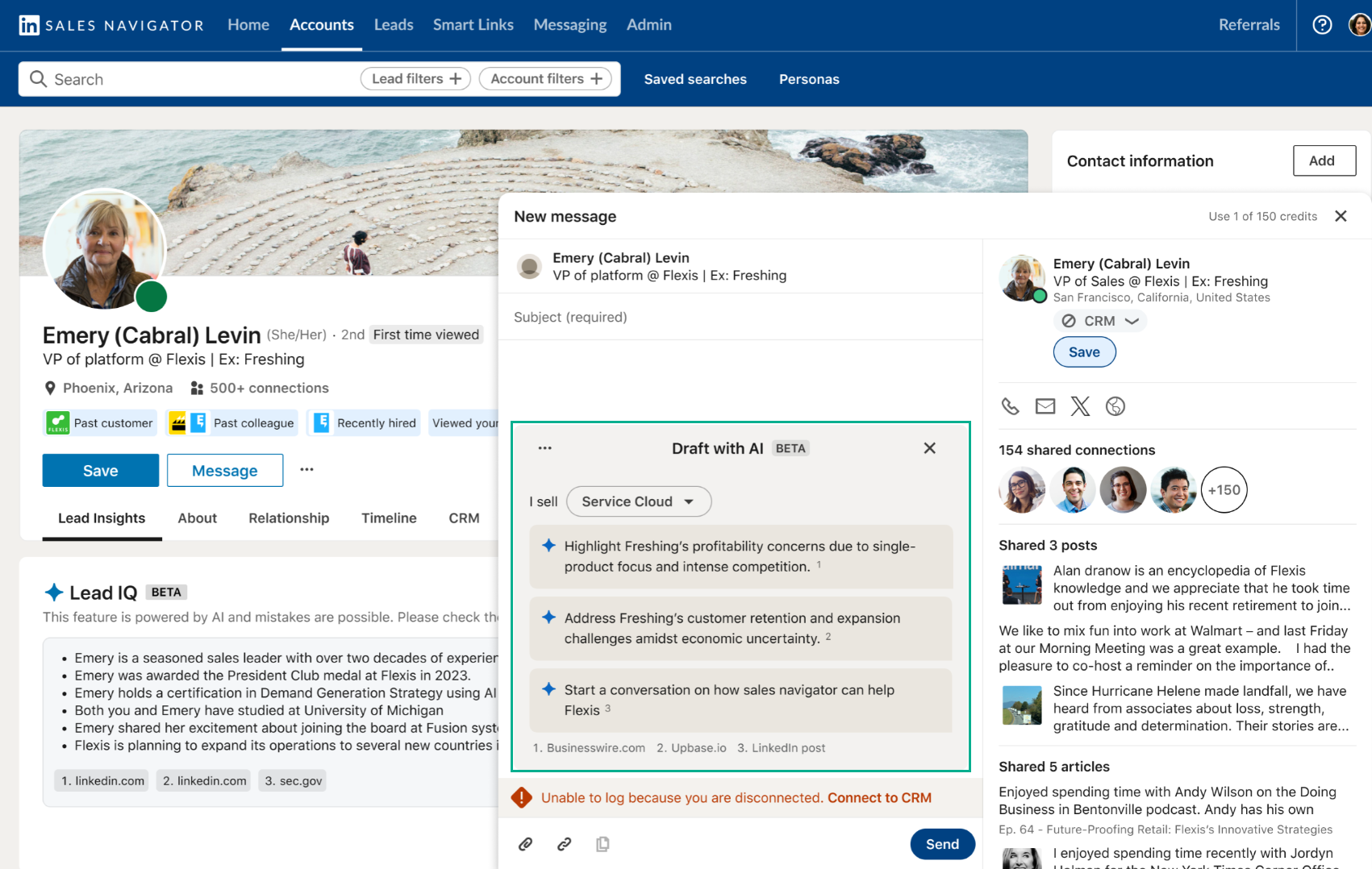
When you draft an InMail in Sales Navigator to a lead you’ve never messaged before, you’ll see the draft with AI option at the bottom of the Compose Message window. Learn how to draft a message with Message Assist.


What are the Best Practices for Message Assist?

Once Message Assist drafts your InMail, we suggest reviewing and editing it before sending. If you want to discard the current message and generate a new draft, simply click Draft with AI again.


For the best results with Message Assist, ensure that the products or services listed in Sales Navigator are detailed and accurate. Personalizing your message drafts with specific product or service information helps tailor your outreach to address the lead’s needs. The more comprehensive the details you provide, the more effective the personalization will be.


What are the Admin controls for this feature?

Message Assist is turned on by default, but admins can turn Message Assist off from their admin settings. Additionally, admins can control product and services personalization, which makes Message Assist more effective by showing how your product or solution can best fit the needs of the lead you’re messaging. As an admin, you can: 


To learn more about this feature you can visit our Help Center here or you can watch this video to understand more about Message Assist!


Hope you find this post helpful and, as always, share with us what you think of Message Assist below! 👇

7 replies

Sinchu Raju
Community Champion
Forum|alt.badge.img+10
  • Community Champion
  • June 11, 2025

Thanks for this detailed overview, ​@Kamille_Community Manager! I’ve started using Message Assist in Sales Navigator and find it really helpful for saving time and making my outreach more relevant. The AI-generated drafts are a great starting point, especially since they leverage both Lead IQ and Account IQ insights to personalize messages based on recent activity and company priorities.

I always review and tweak the AI draft to add my own voice and ensure it matches the prospect’s needs. I’ve also noticed that keeping my product and service details up to date in Sales Navigator makes the suggestions even more tailored and effective.

Overall, Message Assist has helped me reach out to more decision-makers efficiently, while still maintaining a personal touch. Looking forward to seeing how this feature evolves further!


Kamille_Former Cmty Manager
Community Champion
Forum|alt.badge.img+8

Hi ​@Sinchu Raju, it’s so great to hear that you have been able to already make use of this feature! Curious to hear if you have any tips or suggestions for others you’ve gathered since using the feature?


Regards,

Kamille


Damien-XocialGong
Community Expert
Forum|alt.badge.img+4

Didn’t realize I missed this. But, to be honest, I ran into this feature by accident. I like that LinkedIn is adding AI features. How about adding a personal LinkedIn AI agent that helps coach us based on our specific goals 🤔💭😃


Francesca_Community Manager
Community Champion
Forum|alt.badge.img+7

Glad you found this gem helpful, ​@Damien-XocialGong! Message Assist really does help with saving time. Have you tried using it with Lead IQ and Account IQ? The message suggestions are really well tailored to each case - but don’t forget to add your personal touch! ✨

I think a personal LinkedIn AI agent is a great idea, ​@Damien-XocialGong - you should submit to the product team! 


Damien-XocialGong
Community Expert
Forum|alt.badge.img+4

@Francesca_Community Manager I tried Message Assist as is and played with it a bit. It recognized my offer and suggested to my test prospect what I can do for them. I'll need to experiment with it more. I'm not sure I've used Lead IQ, but I definitely use Account IQ. Sometimes I use things without realizing it. I enjoy building trees of DMs in Account IQ, but for someone like me who primarily targets small businesses with 10 or fewer employees, Account IQ usually doesn't provide more information than I already know, mostly because many small business owners have a serious online presence deficit. I have some tech where I run an audit of their online presence and use that as a tool to show them why their business isn’t getting passive leads, therefore they need a place like LinkedIn to find DM’s who fit their ideal customer profile.


Francesca_Community Manager
Community Champion
Forum|alt.badge.img+7

@Damien-XocialGong if you didn’t realise you were already using them, then it means the experience is seamless 😄 let us know how you get on with using Message Assist!

And yes, often small business owners struggle to build their digital presence - but luckily your company is there to help!


Damien-XocialGong
Community Expert
Forum|alt.badge.img+4

Love the response ​@Francesca_Community Manager 😃🥳